Clip by Teyuto – Video & Screen Recorder
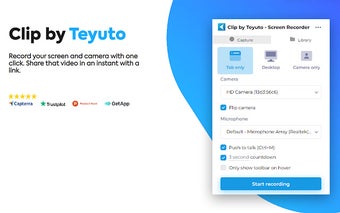
Clip by Teyuto is a free video and screen recording software available on the Chrome platform. With just one click, users can easily record their screen and camera, making it ideal for various purposes such as work, education, or product demonstrations.
One of the standout features of Clip by Teyuto is its ability to annotate the screen during recordings. Users can draw anywhere on the screen, add text, and create arrows to provide detailed explanations or contextual feedback. Additionally, the software allows users to highlight their clicks, focus on the mouse cursor, or hide it from the recording, providing flexibility in recording options.
Clip by Teyuto also offers individual controls for microphone and computer audio, allowing users to adjust audio settings according to their preferences. It includes features such as push to talk and various customization options like custom countdowns and show controls only on hover.
Exporting recordings is made easy with Clip by Teyuto. Users can save their recordings as mp4, gif, or webm files, or directly save the video to Teyuto. The software also provides the option to trim or remove sections of the recording, enhancing the editing capabilities.
Overall, Clip by Teyuto offers a comprehensive set of features for screen and video recording, making it a valuable tool for professionals, educators, and anyone in need of a reliable recording software. Best of all, it's completely free to use with no sign-in required.